

Initial Kustomer configuration
Before your Ada team can enable the Kustomer integration, complete the following prerequisites in your Kustomer instance. This guide assumes an active Kustomer instance configured to handle chat conversations. Once finished, share the collected information with your Ada representative.
Generate a Kustomer API token
Ada calls the Kustomer API using a dedicated API token. Creating a token used only for this integration is recommended.
To generate the API token:
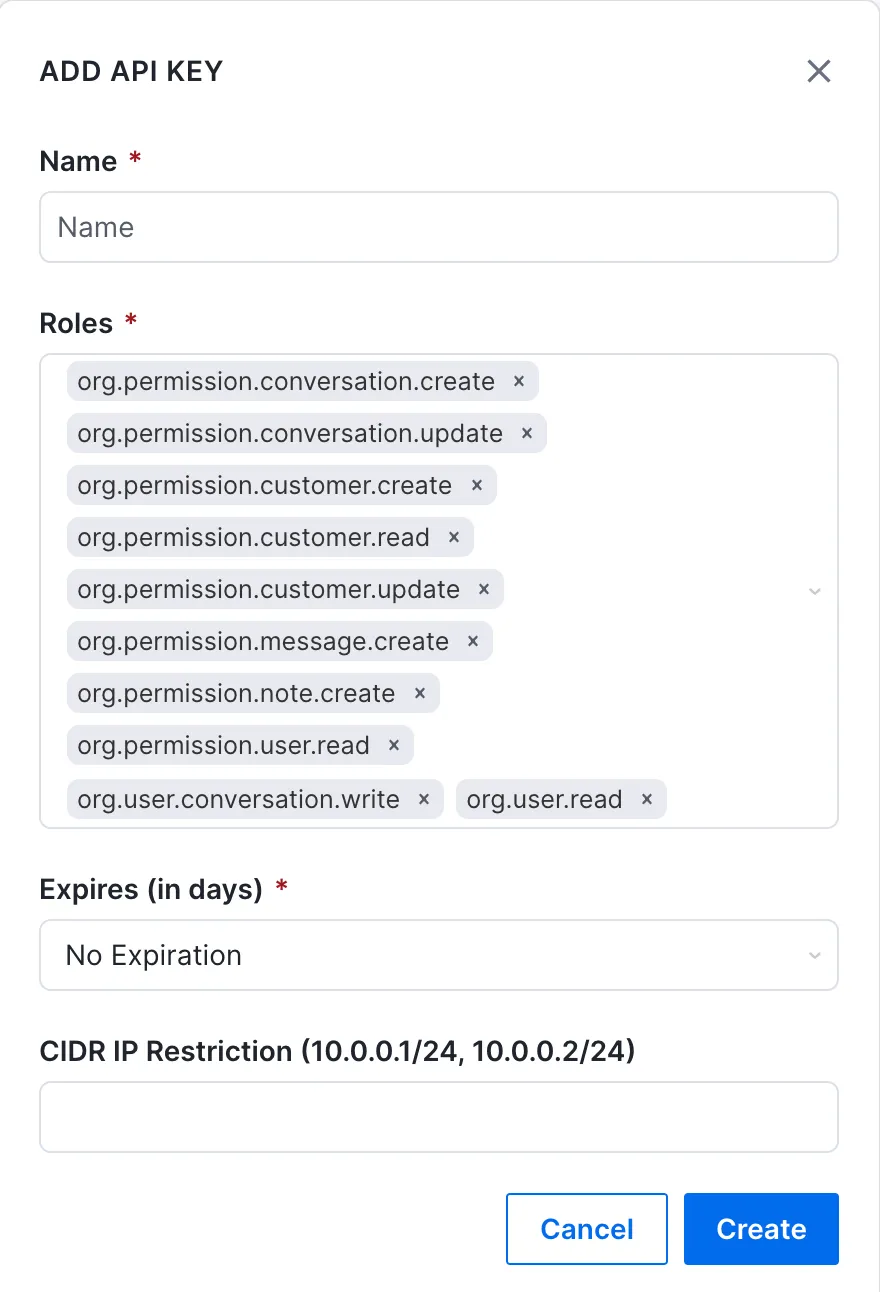
- In Kustomer, navigate to Settings → Security → API Keys.
- Add a new API key and enter a Name (for example,
Ada Integration). - In the Roles field, add the following roles:
org.permission.conversation.createorg.permission.conversation.updateorg.permission.customer.createorg.permission.customer.readorg.permission.customer.updateorg.permission.message.createorg.permission.note.createorg.permission.user.readorg.user.conversation.writeorg.user.read
- Set Expires (in days) to No Expiration.
- Click Create. Kustomer generates the API token. Save it; you share it with your Ada team.
Configure the Kustomer Outbound Webhook
Kustomer sends conversation and message events to Ada through an Outbound Webhook, which lets Ada relay agent replies and detect when a conversation is closed.
To configure the Outbound Webhook:
- In Kustomer, navigate to Settings → Platform → Outbound Webhooks.
- Add a new Outbound Webhook and configure the following:
- Name: a recognizable name (for example,
Ada Handoff Integration). - URL: Ada’s webhook URL, based on the AI Agent’s cluster:
- US & CA:
https://solutions.ada.support/messaging-connectors/kustomer/webhooks/kustomer - EU:
https://solutions.eu.ada.support/messaging-connectors/kustomer/webhooks/kustomer
- US & CA:
- Events: subscribe to both
kustomer.conversation.updateandkustomer.message.create.
- Name: a recognizable name (for example,
- Save the Outbound Webhook.
Choose the snooze behavior
Ada treats both Done and Snoozed Kustomer conversation statuses as a closed conversation by default, so the end user can resume chatting with the AI Agent in either case. If your team uses snooze as a temporary hold rather than a close, Ada can be configured so that only Done ends the handoff.
Decide which behavior you want and include it when you share your details with your Ada team. Your Ada team can also change this setting after setup.
Share with your Ada team
Once the prerequisites above are complete, share the following with your Ada representative securely — not in a shared channel.
- Kustomer hosting region — whether your Kustomer instance is US-hosted (API base URL
https://api.kustomerapp.com/v1) or EU-hosted (API base URLhttps://api.prod2.kustomerapp.com). If unsure, check with your Kustomer account team. - Kustomer API token — the token generated above.
- Snooze behavior (optional) — only needed if you want Done to be the only status that ends the handoff.