

Playbooks
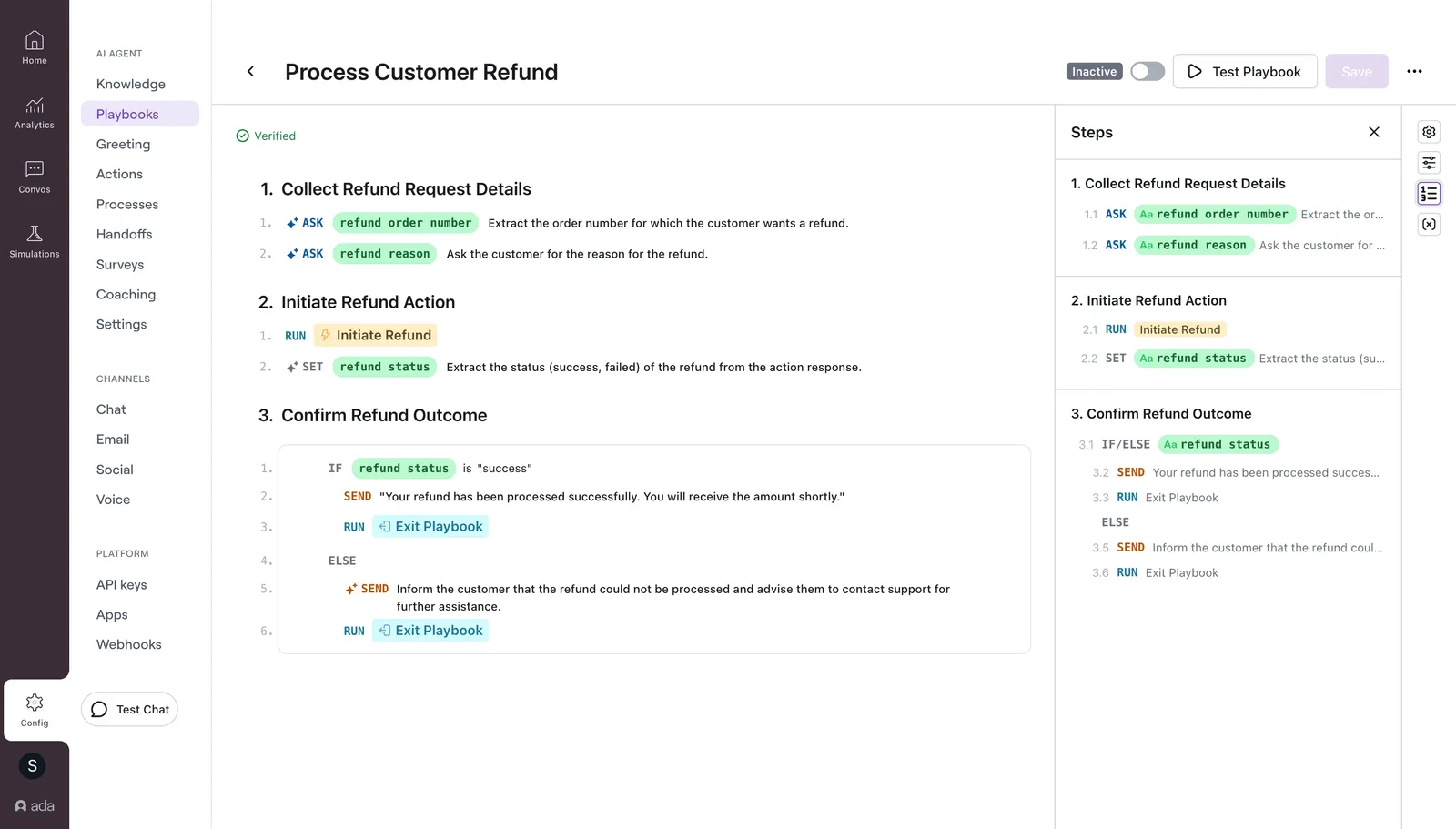
Playbooks are structured, step-based workflows that guide AI Agents through complex, multi-step conversations. Each Playbook is composed of discrete steps (such as ASK to collect information from end users, SET to store structured data into variables, and RUN to execute API tools) organized into sections that represent stages of the end user journey.
Playbooks work alongside API tools, Handoffs, Variables, and Knowledge to enable your AI Agent to perform backend operations, integrate with external systems, escalate when needed, and maintain consistent logic throughout a conversation.
Playbooks, Processes, and Playbooks (Classic)
Three workflow types exist for guiding AI Agents:
- Playbooks are the recommended way to build structured, multi-step workflows. Use Playbooks for all new automation.
- Processes (legacy) are block-based workflows for interactions requiring exact wording. Processes remain functional but are no longer actively developed. Use Playbooks instead for new workflows.
- Playbooks (Classic) (legacy) are the freeform Playbook authoring experience used between August 2025 and June 2026. Classic Playbooks continue to operate for existing users. Accounts onboarded after June 2026 do not have access to Playbooks (Classic).
How Playbooks work
A Playbook is organized into sections, each representing a phase of the workflow (for example, “Verify identity”, “Look up order”, “Process refund”). Within each section, steps execute sequentially unless redirected by an IF/ELSE branch or a GO TO jump.
Each Playbook also has General Guidelines — global context that applies across all sections, covering tone, guardrails, knowledge references, and edge case handling.
At runtime, the AI Agent follows the steps in order, evaluating conditions, executing actions, and interacting with end users as directed. The Agent uses context from the conversation and variable values to determine which branches to take and how to phrase responses.
While a Playbook runs, the AI Agent continuously monitors the conversation and can intervene automatically — detecting intent changes, pausing to perform Knowledge searches (the same Q&A search your Agent uses outside of Playbooks), or escalating — without requiring explicit steps in the Playbook.
Step types
Every Playbook is built from six step types. Each step performs a single, well-defined operation.
For detailed field-level documentation on each step type, see Step reference.
Limitations
-
Limited Coaching support: Coaching can guide when and which Playbook to use, but is not considered during Playbook execution. To adjust the Agent’s behavior within a Playbook, edit the Playbook directly.
-
General Guidelines cannot set variables: General Guidelines provide global context to the Agent but cannot write variable values. A Variable reference in General Guidelines reads as the variable’s name, not its value. To use or write a value, use a
SEND,ASK, orSETstep in the Playbook body. -
General Guidelines cannot run Handoffs, API tools, linked Playbooks, or Exit: A reference in General Guidelines names the item the Agent must use. It does not run the item. To run a Handoff, an API tool, a linked Playbook, or Exit, use a
RUNstep. -
Knowledge reference limitations: When referencing Knowledge in Playbooks:
- Articles cannot be referenced by URL. Use
@ArticleNamementions or natural-language search instructions in General Guidelines, or reference the article in aSENDstep. - Contextual AI-generated
SENDsteps are the only steps that can search or reference Knowledge. See Search Knowledge inSENDsteps. For other steps, reference Knowledge in General Guidelines or rely on the runtime harness to perform Q&A searches automatically. - Knowledge references do not override availability rules. If an availability rule filters an article out for a conversation, the AI Agent cannot use it even when a Playbook references that article directly.
Example: an article on regional refund policies has an availability rule restricting it to EU users. A refund Playbook references that article. When a US user triggers the Playbook, the rule filters the article out by region, so the Agent never sees it and responds without that content.
- Articles cannot be referenced by URL. Use
-
Linked Playbook version compatibility: Playbooks cannot link to Playbooks (Classic), and Playbooks (Classic) cannot link to Playbooks. All Playbooks in a linked chain must be of the same version. See Version compatibility.
-
Language support: English is the only supported authoring language for Playbooks.
- Authoring in other languages is not supported.
- Ada cannot troubleshoot or guarantee functionality for Playbooks written in languages other than English.
- At runtime, conversations are supported in any language the AI Agent otherwise supports. Fixed message
SENDsteps are translated automatically into the end user’s language.
Use cases
Playbooks support a range of scenarios:
- Problem resolution: Troubleshooting issues and handling complaints (for example, tracking an order, replacing a lost card).
- Processing requests: Assisting end users with straightforward tasks (for example, updating an address, upgrading an account).
- Gathering information: Collecting details from end users to support follow-up actions (for example, qualifying leads, capturing preferences).
- Security & verification: Confirming user identity before making sensitive changes (for example, authentication flows, investigating potential fraud).
Capabilities
- Structured step-based authoring: Build workflows using discrete steps with clear inputs, outputs, and execution semantics instead of freeform natural language.
- Two variable-setting modes:
SETsilently assigns values (exact or AI-inferred).ASKprompts the end user and captures their response. The distinction eliminates ambiguity about when the end user is involved. - Conditional branching with nested logic:
IF/ELSEsteps support both flat conditions and multi-group nested AND/OR logic for complex decision trees. - API tool error handling: When an API tool fails, save the HTTP status code to a variable and branch on it with
IF/ELSEto build custom fallback behavior. - Linked Playbooks: Break large workflows into smaller, reusable components. A parent Playbook calls a child, the child runs to completion, then control returns.
- Reference API tools and Handoffs: Connect to external systems via API tools and escalate to human agents via Handoffs.
- Reference Variables: Read Global Variables, Sensitive Variables, and Metavariables to personalize responses and control flow.
SETandASKsteps write to Global and Sensitive Variables. - Reference Knowledge: Scope Knowledge articles via availability rules and reference them in General Guidelines. The Agent retrieves relevant content at runtime.
- Image support: Attach images to
SENDsteps to deliver visual context alongside text. Supports JPEG, PNG, and GIF across Messaging, Email, SMS, Facebook Messenger, WhatsApp, and Voice. See Media. - Multi-channel support: Playbooks are supported on Messaging, Email, and Voice channels.
Related features
- Get started: Create your first Playbook.
- Configure: Set up Playbook details, sections, steps, General Guidelines, and side panes.
- Step reference: Detailed field-level documentation for each step type.
- Media: Image support — formats, channels, accessibility, and handoff visibility.
- Best practices: Guidelines for writing effective Playbooks.
- Test and publish: Test, publish, and manage Playbooks.
- API tools: Connect your AI Agent to external systems and APIs.
- Processes: Block-based workflows for interactions requiring exact wording.
- Handoffs: Escalate conversations to human agents.
- Variables: Store and reuse information collected during conversations.
- Playbooks (Classic): Documentation for the legacy freeform Playbook authoring experience.