

Salesforce Messaging field mapping
Overview
Update and map custom fields in the Salesforce Messaging Handoff block to pass additional information from your Ada AI Agent to Salesforce during Handoffs.
Prerequisites
Before beginning, ensure that the fields you want to add to the block are already set in the Pre-Chat fields in your embedded service deployment.
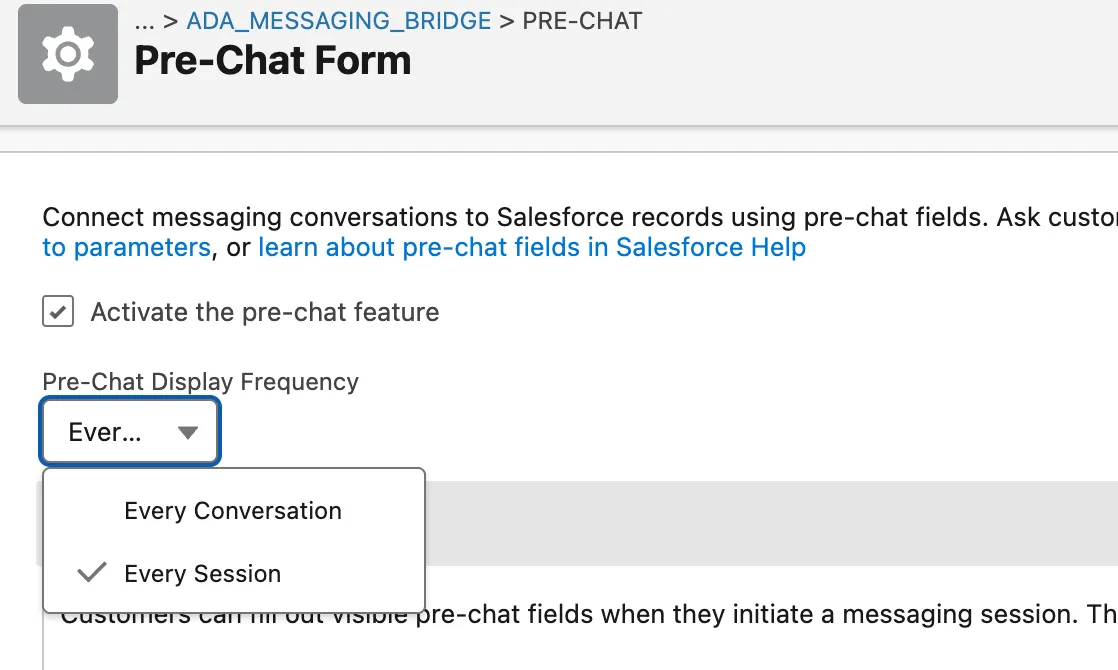
Ensure that Activate the pre-chat feature is selected and Pre-Chat Display Frequency is set to Every Session. If you are configuring these for the first time, make sure to save them and then publish your embedded service deployment so those changes appear.
Quick start
Complete these steps to update field mapping. See Implementation & usage for detailed instructions.
Implementation & usage
Update the field mapping in the Handoff block to pass additional data to Salesforce.
Update field mapping
Share the required field information with your Ada team to configure custom field mappings.
To update field mapping:
-
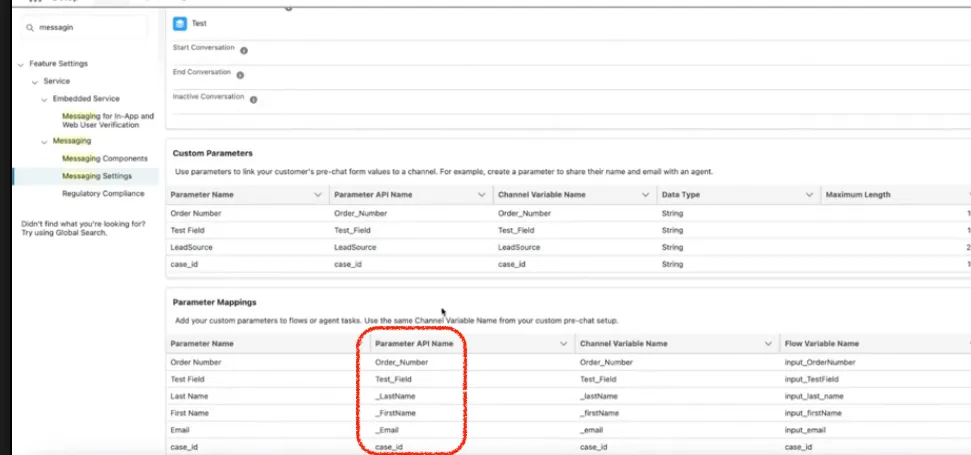
Identify the key fields required to map:
- description: Name of the field provided by the customer.
- display_name: The Parameter Name displayed in the block.
- id: The Parameter API Name provided by the customer from their Salesforce Custom Parameters/Parameter Mappings. This is the most important field required to ensure correct mapping.
-
Share this information with your Ada team. Once configured, these fields will be available as optional inputs in the Salesforce Messaging Utils block.