

Attachment handling
Overview
By default, your AI Agent hands off all emails that have attachments to human agents. You can change this behavior for each inbox: keep the default, or let your AI Agent reply to the email body — either discarding the attachment, or keeping it in case the conversation is later handed off.
Limitations
AI Agents can send up to 30 MB in files with a Handoff. Different email clients and receiving agent platforms have their own limitations on file sizes (e.g., Gmail has a limit of 25 MB), so if a customer tries to send a large attachment, it might not get delivered to your AI Agent or passed on to your agent platform.
Use cases
Attachment handling is useful in the following scenarios:
- Escalating emails with attachments: When end users send emails with attachments, your Email AI Agent can hand off these conversations to human agents, ensuring attachments are available for review.
- Passing files to support platforms: When handing off conversations to your agent platform, attachments are passed through so human agents can access the files end users sent.
- Reviewing customer-submitted documents: Human agents can access documents, images, spreadsheets, and other files that end users attach to their email inquiries.
Capabilities & configuration
Your AI Agent can pass email attachments to human agents through supported Handoff blocks. Attachments are securely saved upon receipt and automatically deleted after 7 days.
Choose how each inbox handles attachments
Each inbox has its own Attachment handling setting that controls what happens when that inbox receives an email with an attachment.
To change an inbox’s attachment handling:
-
On the Ada dashboard, go to Config > CHANNELS > Email.
-
Click the inbox you want to configure.
-
Under Attachment handling, select an option, then click Save:
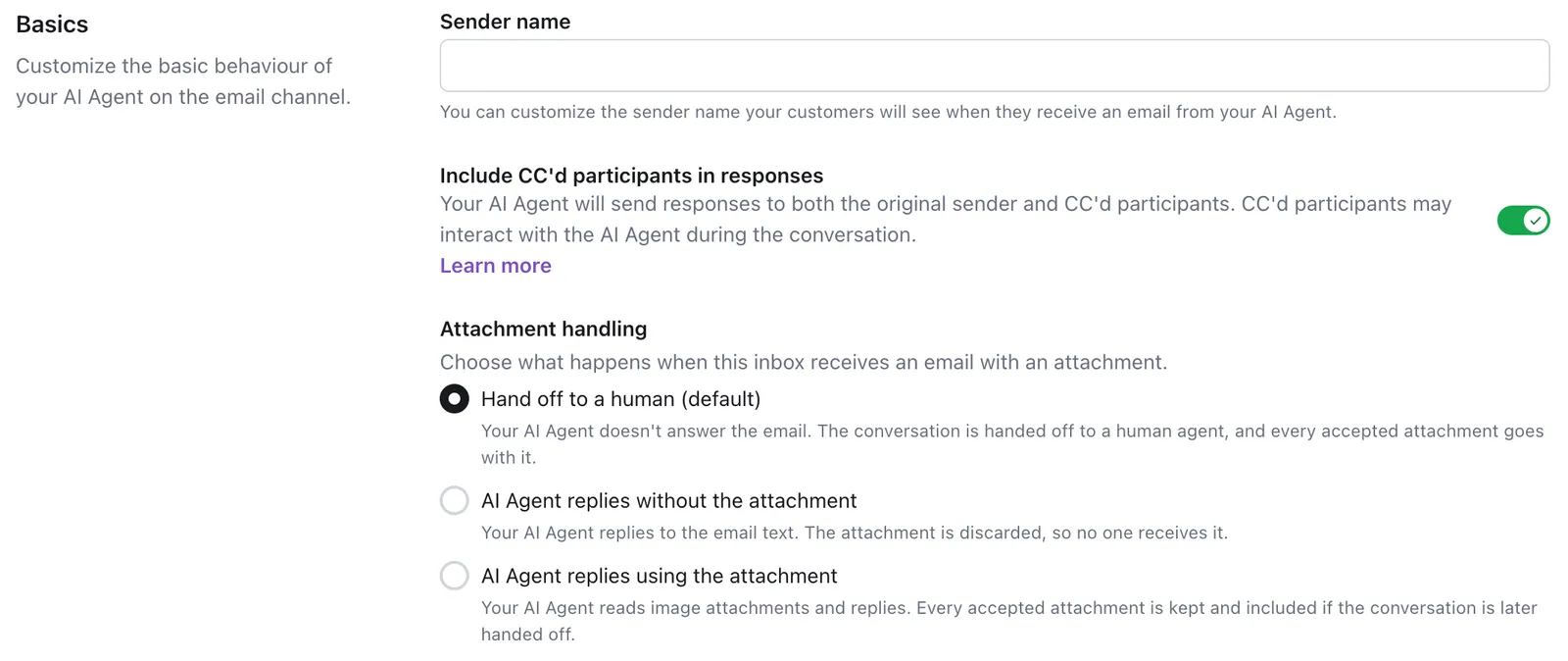
An attachment with an unsupported file type is rejected when the email arrives. If the conversation is handed off, the human agent gets a note that names the skipped file. See Accepted file types and Restricted file handling.
The setting applies per inbox, so different inboxes on the same AI Agent can handle attachments differently. Small inline signature images in an email aren’t treated as attachments — emails whose only image is a signature are processed as regular text in every mode.
Files sent through the Email API follow the same setting. They’re never treated as signature images, so a small or transparent screenshot counts as an attachment.
Your AI Agent reads image attachments only on the AI Agent replies using the attachment setting. See Images for the formats it reads and which images it withholds. A HEIC or HEIF image that the Agent reads is kept as its JPEG conversion, so human agents receive a .jpg on handoff.
Supported Handoff blocks
Email attachments can be passed on the following Handoff blocks:
- Zendesk Ticketing block
- Salesforce block
- Salesforce Email block
- Email block
Accepted file types
Your AI Agent can pass along files with the following extensions to agents:
Restricted file handling
If your AI Agent restricts a file from being passed through to your agent platform, either due to its size or an unsupported file extension, it adds a comment to the ticket explaining which file(s) it restricted, and why.

Quick start
Enable attachment handling in your Handoff block. For detailed instructions, see Implementation & usage.
Configure your Handoff block to pass email attachments to your agent platform.
Implementation & usage
Configure your Handoff block to pass attachments to your agent platform.
To set up attachment handling:
-
Add the File Data Token field from the Optional Inputs dropdown in your Handoff block.
-
In the File Data Token field, add the email_attachments variable to ensure that your AI Agent can pass any attachments to your agent platform.

Viewing attachments in Convos
In the Convos view, you can see if customers sent attachments by looking in the conversation metadata. If the email_has_attachments metavariable is True, the conversation has attachments stored on it. On inboxes set to discard attachments, the variable is False even when the customer’s email included an attachment, because the file wasn’t kept.
Related features
Explore additional Email Handoff and configuration options.
- Email handoffs: Configure Handoff blocks for your Email channel.
- Handoffs: Learn about Handoff capabilities across all channels.
- Conversations: View attachment metadata in conversation details.
- Images: Learn how your AI Agent reads image attachments.