

Handoff scenarios
Overview
Ada supports multiple configurations for escalating Email conversations to human agents. Depending on your agent platform, channel setup (e.g., Email, Web Chat, or both), and desired escalatory experience for human agents and end users, you can choose to create new tickets or update existing ones, and determine how human agents should respond.
Common scenarios
The following multi-channel scenarios cover typical handoff configurations. While many involve deciding whether to create a new ticket or case or update an existing one, others—such as using Email as an extension of Chat—focus on address and threading rules, and sometimes involve replying to existing tickets in your agent platform (e.g., Zendesk, Salesforce). Additional scenarios may apply depending on your specific implementation.
Scenario 1: Email API–only implementation (no Direct Email)
Update existing tickets instead of creating new ones when every conversation starts from an existing ticket. The following flow applies to:
- Email-only implementations
- Omni-channel implementations (when using the Email API for the Email channel)
To set this up, follow these steps:
-
Create a Handoff flow in Ada with a rule that makes it trigger only for the Email channel.
-
Pass the originating ticket ID into Ada.
In the webhook that passes inquiries to Ada via Email API, include the
ticket_IDin the Email API metadata. For example:The variable name from the Email API metadata is saved in Ada with an Ada prefix to indicate its source. In the above example, the
ticket_idis stored asada_email_webform_ticket_id. -
Follow the platform-specific instructions to configure how Ada updates tickets.
Zendesk
Add an HTTP Request block to your Handoff and call Zendesk’s bulk update endpoint:
-
In the HTTP Request block’s URL field, append the Ada-prefixed variable to the end of the endpoint URL.
-
Under Headers, add an Authorization token.
-
Under Body Content, link each relevant Zendesk field you want to update to its corresponding Ada variable.
Salesforce
Add a Salesforce block to your Handoff.
-
In the Salesforce block, set the Select Action field to Update Case.
-
Link each relevant Salesforce field you want to update to its corresponding Ada variable.
Other platforms
If the platform provides an API endpoint for updating tickets, use an HTTP Request block together with the Ada-prefixed variable in the update request.
-
FAQs
Why can't customers update existing tickets if they implemented Ada's Email channel via Direct Email?
When an end user emails Ada directly, there’s no ticket/case yet in Zendesk or Salesforce. The conversation lives in Ada until a Handoff is initiated. At escalation, Ada creates a new ticket/case (which receives a ticket ID). This ticket ID can be passed back to Ada only if the handoff block is configured to save it.
Will Handoffs to Zendesk or Salesforce continue in the same thread? Can human agents reply from the same email address as the AI Agent?
Will Handoffs to Zendesk or Salesforce continue in the same thread? Can human agents reply from the same email address as the AI Agent?
- Zendesk: No. Updating a ticket via an HTTP request does not support shared email address/thread behavior. That behavior is supported only by the Zendesk Support block.
- Salesforce: No. Replies to updated cases will start a new email thread, since human agents must use a different email address than the AI Agent.
Any special considerations when using both Ada Email and Ada Chat?
If human agents reply to a Zendesk ticket not created via the Zendesk Support block, they must reply from an email address that is not configured as a channel on this AI Agent. This applies to:
- Chat handoffs: Zendesk Messaging/Zendesk Ticketing block
- Email handoffs: where the Zendesk Support block is not used
Scenario 2: Create new tickets with Direct Email, update existing ones with Email API
If you are using both Email API and Direct Email, Ada can differentiate between the two and route Handoffs accordingly. In this scenario, Email API conversations update existing tickets, while Direct Email escalations create new tickets. The Handoff should be gated for the Email channel.
It applies to:
- Email-only implementations
- Omni-channel implementations
To set this up, follow one of these Handoff flows:
- Single Handoff flow gated for the Email channel, with conditionals: If a conversation contains a specific variable, or it originates from:
- Direct Email, then configure the handoff block to create a new ticket or case.
- A Webform, then configure the handoff block to update an existing ticket or case.
- Two Handoff flows, each gated by origin (Direct Email or Webform) or metadata (containing a specific variable):
- One for updating existing tickets
- One for creating new tickets
Here’s what this looks like in practice in different platforms:
Zendesk
- Use the Zendesk Support or Zendesk Ticketing block for conversations that should create a new ticket in Zendesk.
- Use the HTTP Request block for conversations that should update an existing ticket, following these instructions.
Notes:
- Zendesk Support block allows human agents to reply to Email handoffs using the same support address configured with the Email AI Agent; these replies will stay in the same thread.
- Zendesk Ticketing block: With the SMTP Connector configured, human agents can reply using the same support email address in the same thread. Without the SMTP Connector, human agents must reply using a different support email address, and replies start a new thread.
- Tickets updated via the HTTP Request block must be replied to from a different support address than the Email AI Agent. This can be the same address used for Chat handoffs.
Salesforce
- Use the Salesforce block in your Handoff
- To create a new case, in the Salesforce block, set the Select Action field to Create Case.
- To update an existing case, set the Select Action field to Update Case.
Regardless of the setting, human agents must reply from a different support email address than the Email AI Agent. Replies will go to end users in a new email thread.
Other platforms
- If the platform has an API endpoint for ticket creation, to create a ticket, use the Email or HTTP Request block.
- If the platform has an API endpoint for ticket updates, to update a ticket, use an HTTP Request block.
Scenario 3: Email as an extension of Web Chat
In omni-channel configurations, Email is sometimes used as a fallback or follow-up method for Chat Handoffs. In these cases, human agents may be replying to existing tickets in your agent platform (e.g., Zendesk, Salesforce) over email. For any implementation that includes Ada’s Email channel, it’s important to plan which email addresses your human agent teams and your Email AI Agent will use to ensure correct threading behavior and avoid unexpected AI Agent re-entry.
For more details, see this decision table.
Key rules
For Zendesk users:
- Human agents can use the same support email address configured for the Email AI Agent to reply to messaging handoffs over email if:
- The Zendesk SMTP Connector is configured AND
- Human agents are either:
- replying to tickets created by Zendesk Ticketing OR
- switching channels in Zendesk to reply via email to tickets created by the Zendesk Messaging block i.e. during agent offline hours
Without the Zendesk SMTP Connector configured, human agents must use a different support email address than the one used by the Email AI Agent(BYOD) when continuing Web Chat conversations over email or starting new email conversations with end users that never route to Ada.
Minimum requirements
IF SMTP Connector isn’t configured:
Keep at least one support email address that is not configured as an email channel on this AI Agent. Use it for human agents replying to tickets created via Zendesk Ticketing, Salesforce Case, manually by agents, or any other path that is not the Zendesk Support block.
The Email AI Agent’s configured channels (any address set up via Bring Your Own Domain) can be reused for human-agent replies on tickets created by the Zendesk Support block — replies stay in the same thread on the same address the end user originally wrote to.
For human-agent replies on all other ticket types, the address must be one that is not configured as an email channel on this AI Agent.
Additional considerations
If a human agent replies from the same address used by the AI Agent, but the ticket was not created by the Zendesk Support block, and SMTP Connector isn’t configured, Ada will receive all end user replies to those human agent messages. In this case, the AI Agent may re-enter the conversation with no context, leading to a broken experience and loss of context for the end user.
Without the SMTP Connector (and outside of the Zendesk Support block), using the same address can cause Ada to re-enter threads unexpectedly.
Multi-domain SMTP requirements
For AI Agents with inboxes on multiple BYOD domains:
- The Zendesk SMTP Connector is configured per BYOD domain, not per inbox.
- Inboxes that share a domain share the same SMTP configuration.
- Each new BYOD domain that needs shared-thread human-agent replies requires its own SMTP setup.
- Inboxes on a domain without an SMTP configuration fall back to the AI Agent’s default Zendesk SMTP routing, which only works for the default email channel.
See Zendesk SMTP Connector for setup steps.
Combining handoff blocks across channels
Depending on whether you want Email or Chat escalations (or both), you can mix and match Handoff blocks as needed.
Example 1: Live chat + same-thread email replies
- Chat: Use Zendesk Chat, Zendesk Messaging, or Zendesk Support
- Email: Use Zendesk Support
If using Zendesk Support for both Chat and Email, create two separate handoff flows, gated by channel.
Example 2: Mixed live and async chat + same-thread email
-
Chat:
-
Use Zendesk Messaging or Zendesk Support for live chat
-
Use Zendesk Ticketing for asynchronous fallback
Zendesk Ticketing replies must come from a different address if you don’t have the SMTP Connector configured.
-
-
Email: Use Zendesk Support or Zendesk Ticketing
With the SMTP Connector configured, Zendesk Ticketing replies can use the same address as the Email AI Agent and continue in the same thread. Without the SMTP Connector, replies must use a different address and will start a new thread.
If using Zendesk Support for both Chat and Email you must configure two handoff flows, each gated with a rule for the channel.
Example 3: All channels escalate over email
-
Chat: Use Zendesk Ticketing
-
Voice: Use Zendesk Ticketing
-
Email: Use Zendesk Support or Zendesk Ticketing
With the SMTP Connector configured, Zendesk Ticketing replies can use the same address as the Email AI Agent and continue in the same thread. Without the SMTP Connector, replies must use a different address and start a new thread. Zendesk Support supports same-thread, same-address replies by default.
Best practices for configuring handoff blocks
- Use system variables (purple) in all Handoff blocks
- Common variables include:
emailname,first_name,last_name(generated from email)ada_email_subject(from email subject line)email_attachments: Required only for the Zendesk Ticketing, Salesforce, and Email blocks- Zendesk Support passes attachments by default
Examples
Here are some example configurations for common email handoff scenarios, showing how to apply best practices in different situations.
Send to original sender only
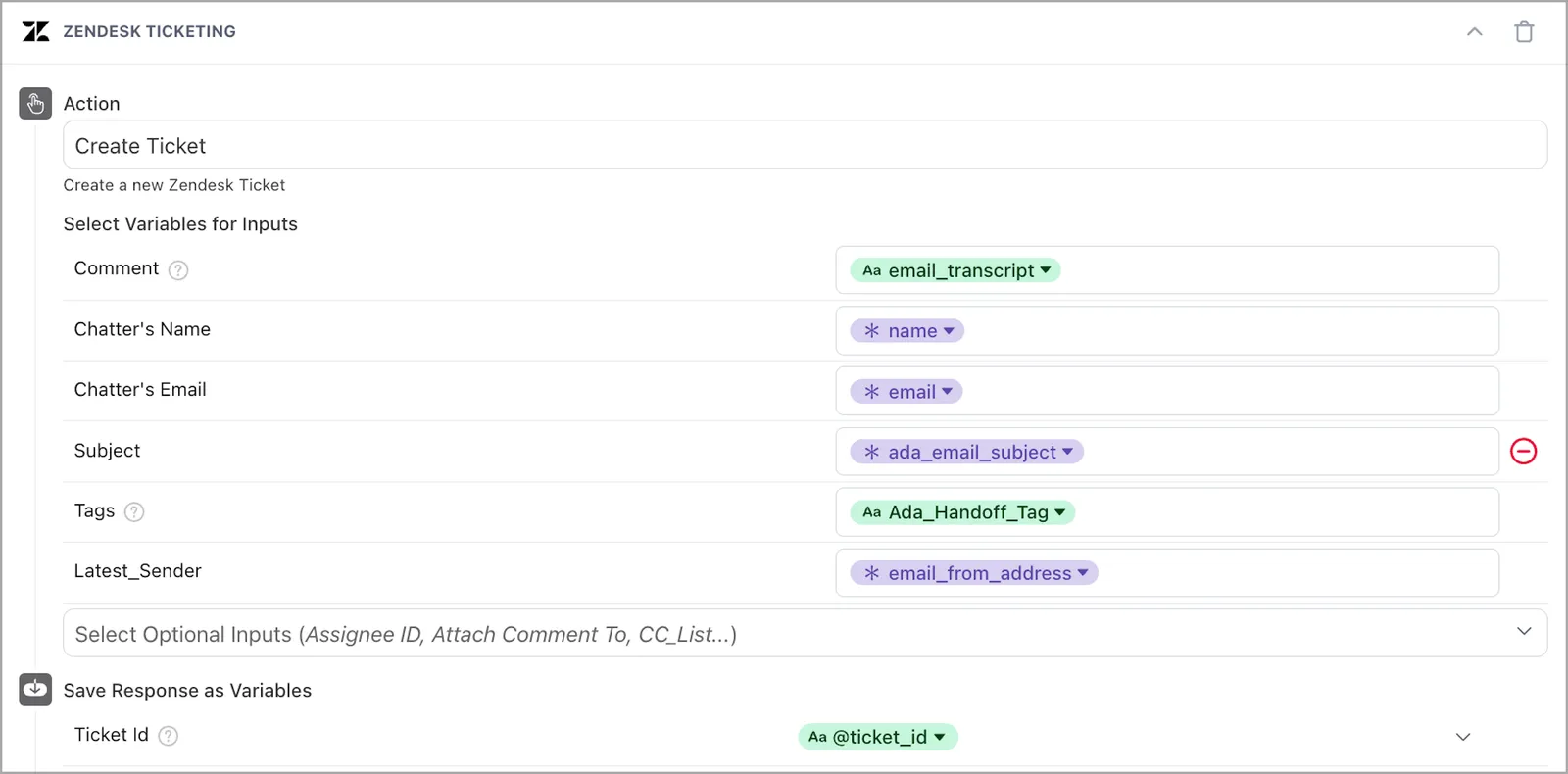
Include CC list
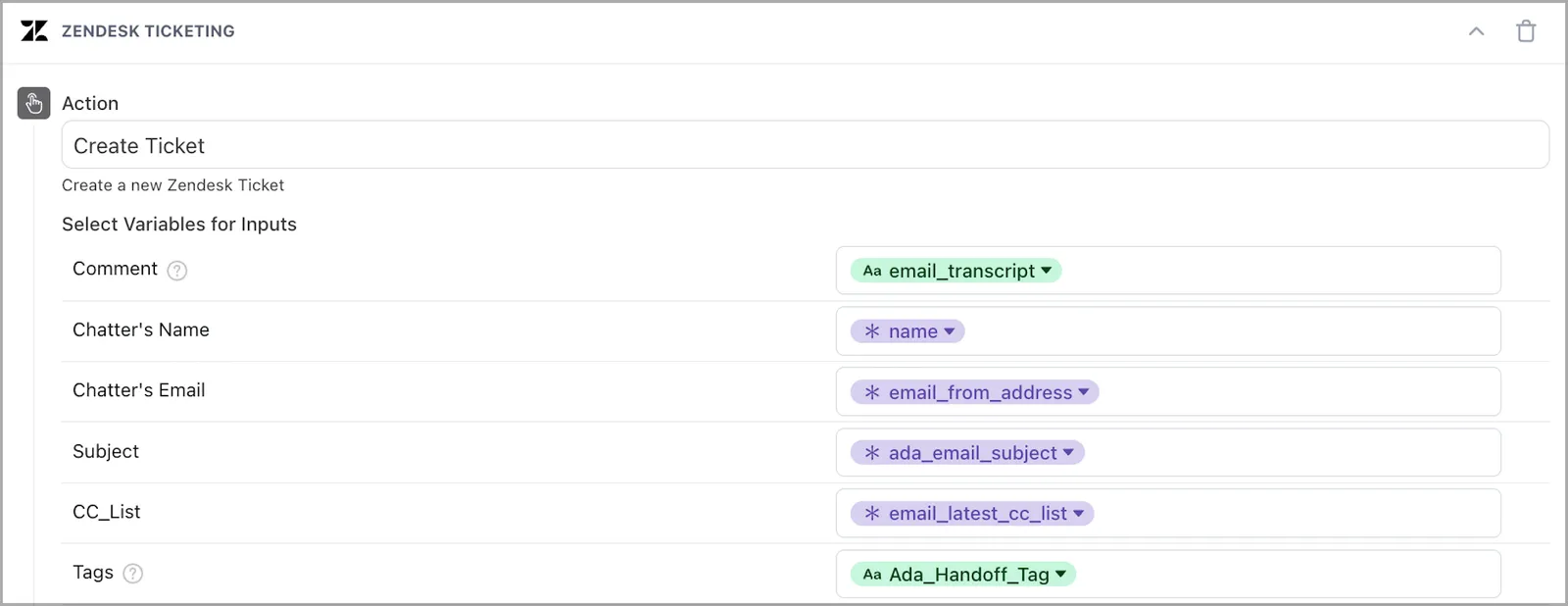
In this example, CC_list is a custom Zendesk field to store CC’d participant email addresses.
Track as handoff

Handling original tickets from Email API
Here’s a common workflow for handling original tickets from the Email API:
- Customer fills out Webform that causes a ticket to be created
- Ticket automation calls the Email API
- Callonversation is handed off
- Ada can either:
- Update the ticket
- Create a new one
The ability to update depends your agent platform and the APIs available to it
- Optional: Automation in agent platform closes tickets after five days
Additional best practices
- Create a dedicated Handoff flow for Email, gated by
channel = Email - Use conditionals and Ada variables to decide when to create vs. update a ticket (ability to update depends your agent platform)
- Choice of handoff block depends on:
- Preferred handoff threading experience for end user
- Whether SMTP Connector is configured or not
Related features
Explore additional Email Handoff and configuration options.
- Email handoffs: Configure Handoff blocks for your Email channel.
- Handoffs: Learn about Handoff capabilities across all channels.
- Zendesk SMTP Connector: Enable shared email addresses between your AI Agent and human agents.
- Multiple participant conversations: Handle emails with CCs and multiple recipients during Handoffs.
- Attachment handling: Pass email attachments to human agents during Handoffs.