

Personalization data
Overview
For Messaging, use the personalization and identity guide. Metadata supplies profile values; identity tokens verify which end user owns the session.
Personalization in Ada relies on using what you know about your end users—like their name, region, or support plan—to deliver relevant and tailored interactions. It focuses on using data-driven insights to personalize each end user’s experience.
For example, your AI Agent can greet end users by name and offer “Gold” members exclusive offers or priority support, thanks to profile data like membership level or support plan. If missing, Ada can capture details like order number mid-conversation and update the profile immediately—ensuring precise, personalized replies for every interaction.
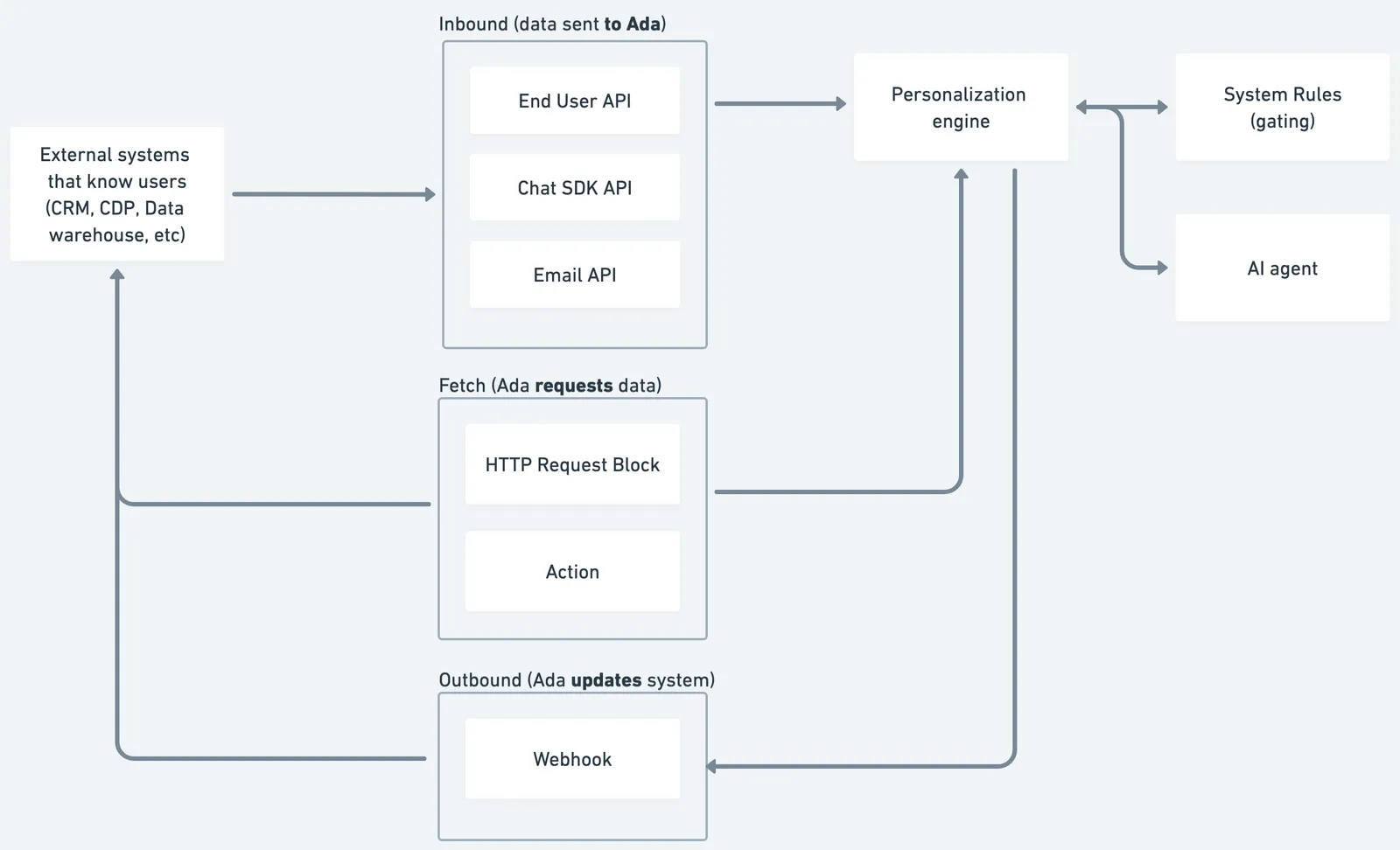
How the engine uses profile data
The Personalization Engine consumes profile data and uses logic layers to turn it into a custom conversation.
System rules (gating)
Deterministic rules decide which Knowledge, Coaching, Actions, Processes, and Handoffs are available.
Example: Show onboarding articles only to Enterprise plans or offer a priority hand-off to end users in Europe.
AI Agent (tailored reply)
All variables—plus any new data gathered during the session—are provided as context to the model so each reply reflects the end user’s situation.
Example: Greet by name, adjust instructions after fetching live account data.
Use cases
Personalization data enables tailored interactions based on what you know about your end users.
- Personalized greetings: Address end users by name and reference their account details to create a more engaging experience.
- Tiered support experiences: Offer premium support options, priority Handoffs, or exclusive content to end users based on their subscription plan or membership level.
- Region-specific content: Gate Knowledge articles, Actions, or Handoffs based on geographic location to ensure end users receive locally relevant information.
- Real-time account lookups: Fetch live data—such as order status or billing details—mid-conversation using Actions so the AI Agent can provide accurate, up-to-date responses.
- Dynamic profile enrichment: Capture information during the conversation (e.g., order number, preferences) and update the end user’s profile immediately for use in future interactions.
Capabilities & configuration
Personalization supports multiple integration paths for moving data between Ada and your systems.
Quick start
Get started with Personalization in a few steps.
Choose an integration path based on your channel and data source (see integration paths table).
Send end user data to Ada using the End Users API, Chat SDK, or Email Conversations API.
For detailed integration instructions, see Implementation & usage.
Implementation & usage
Integrate personalization data using one of the following paths, depending on when and how you want to pass data to Ada.
Inbound paths
Push data into Ada at the start of a conversation using these mechanisms.
End Users API
If your backend system already stores information about your end users—such as names, locations, or subscription tiers—you can use the End Users API to sync that data into Ada.
For example, imagine an end user logs into your app and begins a conversation with your AI Agent. Ada automatically creates an end user profile at that moment and fires a webhook event notifying your system of the new profile. Your system can then send a PATCH request to the End Users API, updating the end user’s profile with metadata.
For example:
These values are saved as variables in the end user’s profile and are immediately available to the system to determine content availability through rules in Knowledge, Coaching, Actions, Playbooks, Processes, and Handoffs and to AI Agent to access, respond to, and adapt the conversation accordingly.
This approach is ideal when you already have a reliable end user identifier (like an email or internal ID) and want to enrich the profile. It also works across all supported channels.
Chat SDKs
For web or app-based chat experiences, personalization can be handled directly using the Chat SDKs.
If an end user logs into your website and opens the Ada Chat, and their name, email, or customer ID is already available in your app, you can pass that data into the chat when it loads using metaFields. Alternatively, if the end user logs in after the chat has already loaded, you can update their profile using setMetaFields. In both cases, this data is stored in the end user’s profile as variables.
These values become available immediately and can be used to personalize replies (e.g., “Hi [name]”) or to determine content availability through rules in Knowledge, Coaching, Actions, Playbooks, Processes, and Handoffs. This method is limited to chat, but works well when end user-specific data is available from the hosting site or app.
Conversations API
Ada can receive personalization data as part of an inbound email conversation using the Email Conversations API.
Imagine a support request comes through a contact form. Your system forwards the request to Ada via a POST call to the Email Conversations API, including the end user’s name, email address, and any relevant metadata—such as ticket_id or product_tier. When this call is received, Ada automatically creates an end user profile, and the metadata is stored as variables.
Because this data is attached to the end user profile up front, it can be used immediately in the conversation and for content gating, even before the AI Agent sends a reply. Variables in the end user’s profile are available right away for personalization or to determine content availability through rules in Knowledge, Coaching, Actions, Playbooks, Processes, and Handoffs. This method is specific to the Email channel but is highly effective when profile data is already known at the start.
Fetch paths
Retrieve dynamic, on-demand information mid-conversation to personalize the AI Agent’s replies. Unlike inbound paths, which rely on data known upfront, fetch paths allow the AI Agent to reach out to your system—like an order tracking API or account management system—to bring back the latest updates.
HTTP Request block
Ada allows you to update an end user’s persistent profile (profile.metadata) directly from the conversation. To do this, you can configure a Request block to send a PATCH request to the End Users API. The Request block must target the specific end user’s endpoint URL (https://{bothandle}.ada.support/api/v2/end_users/{end_user_id}), with the end_user_id dynamically inserted. An Authorization header is required, passing the API key as a Token. In the body of the request, the payload must be structured under a profile object, containing the key-value pairs you want to update.
For example, if the end user’s name and plan are captured during the conversation, the Request block could send the following:
Request blocks are available as part of Greetings, Processes and Handoffs. This approach allows you to immediately enrich the end user’s profile with newly collected information, making it available for future personalization and access control.
Actions, Processes, and Playbooks
Actions let the AI Agent make API calls during a conversation to retrieve real-time data—like order status or account details—so it can tailor replies dynamically. Actions can prompt end users for inputs (e.g., an email or order ID) and map parts of the API response to outputs that the AI Agent uses in its responses. You configure them in the Ada dashboard by setting up the API call, authentication, and specifying which parts of the response to include in replies.
When Actions are part of Processes or Playbooks, they become steps in a carefully orchestrated, multi-step flow. These Processes let you chain together data-fetching Actions, creating rich, dynamic personalization that complements the profile data already available at the start of the conversation.
Outbound paths
Outbound integration paths ensure your system stays informed about key events in conversations.
Webhooks are real-time notifications that Ada sends to your system whenever something important happens—like when a new end user is created or an existing profile is updated. For example, in the End Users API, there’s a webhook sent when an end user is created and another one when an end user is updated—ensuring your systems stay in sync with Ada’s data.
For privacy considerations and usage examples, see Best practices.
FAQs
Find answers to common questions about personalization data.
Related features
Explore additional personalization and automation options.
- Knowledge: Gate articles based on end user attributes.
- Actions: Fetch real-time data during conversations.
- Processes: Orchestrate multi-step personalized workflows.
- Playbooks: Chain Actions for complex personalization flows.
- Coaching: Apply rules based on end user profile data.
- Variables: Store and manage end user profile data.