

Social channel onboarding
Overview
Integrate with third-party channels to bring the chat experience everywhere your customers are, including email and a variety of social media channels.
This guide will walk you through the setup process, feature compatibility, and channel variable usage for third-party channels in Ada.
This feature may not be included with your organization’s subscription package. For more information, see Ada’s Pricing page, or contact your Ada team.
Limitations
Social channels have the following constraints:
- Zendesk Live Chat incompatibility: The Zendesk Live Chat Handoff is not compatible with social media channels.
- Feature variations: Some features work differently or have partial support across different channels. For example, List Option blocks may display as numbered lists instead of selectable buttons in some channels, and some blocks like Greetings and Satisfaction Surveys are not supported in certain channels.
- Channel-specific requirements: Some channels require specific licenses or configurations (e.g., Sunshine Conversations license for Zendesk Messaging Handoffs).
Use cases
Social channels enable the following scenarios:
- Multi-channel support: Reach customers on their preferred communication channels, including WhatsApp, Facebook Messenger, Twitter DM, Instagram Direct, and Twilio SMS.
- In-channel Handoffs: Connect customers directly to human agents within the same social media channel using Zendesk Messaging or Salesforce Live Chat.
- Email-based Handoffs: Escalate conversations to email when in-channel Handoffs aren’t available, using Zendesk Email Ticketing or Email Handoffs.
Capabilities & configuration
Learn about the features and blocks available for Social channels, and how to configure channel-specific experiences.
Feature compatibility
The following table lists the social media channels you can use with Ada, as well as the features and blocks each one is compatible with.
In some cases, features might be partially supported or work differently in some channels. In those cases, click the 🗒 icon for more information.
Additional notes
For more information on how some channels may work differently from others, please click each expander below.
WhatsApp
-
List options: Customers can see a Make a selection button, which they can tap to choose an option from a pop-up menu, as long as they meet the following criteria:
-
There are a maximum of 10 list options
-
Each option’s button label contains 24 or fewer characters
-
The block is configured to only accept a single selection, rather than multi-select


-
Unlike in web chat, after the customer makes a selection, the Make a selection button is still visible.
Additionally, it’s not possible to customize the “Make a selection” button text.
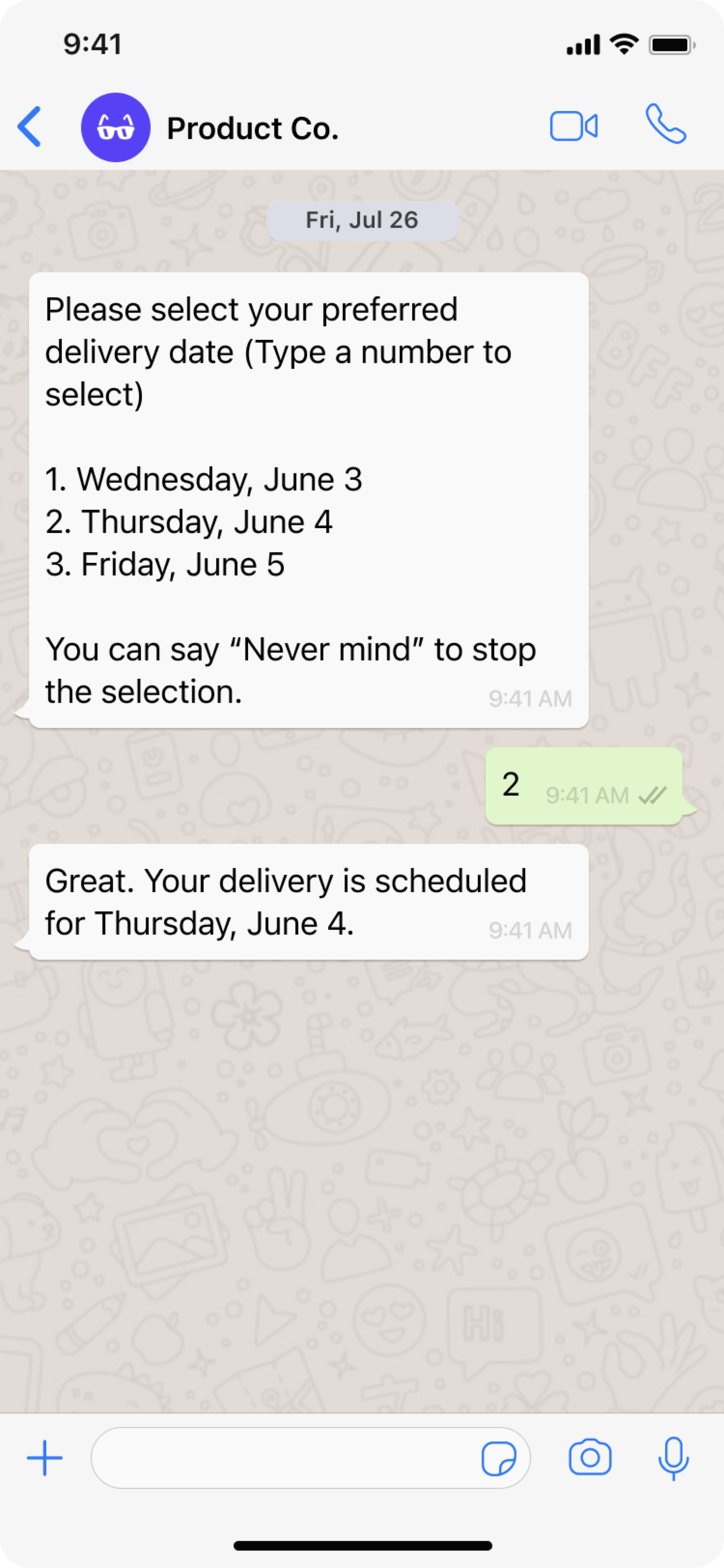
If the list options don’t meet the above criteria, instead of being able to use the pop-up menu, customers see options as a numbered list and can type a number to select the corresponding option.
Some List Option blocks might meet the above criteria, and some might not, so you may see both selection methods.
Facebook Messenger
- List options: Instead of being able to select an option, customers see options as a numbered list and can type a number to select the corresponding option.
Twilio SMS
- List options: Instead of being able to select an option, customers see options as a numbered list and can type a number to select the corresponding option.
Instagram Direct
- List options: Instead of being able to select an option, customers see options as a numbered list and can type a number to select the corresponding option.
Twitter DM
- List options: Instead of being able to select an option, customers see options as a numbered list and can type a number to select the corresponding option.
Sunshine Conversations Web Messenger
There are several blocks and features that work differently from Ada’s default chat in Sunshine Conversations Web Messenger. For additional information, see Understand how Ada features work in Sunshine Conversations Web Messenger.
-
Greetings: Sunshine Conversations Web Messenger does not support Ada’s Greeting. On social channels, the user must always send the first message, and the AI Agent responds using its reasoning engine—not the configured Greeting flow.
If the user types something like
hello, the AI Agent may generate a natural greeting response, but this does not trigger the Greeting or any Greeting steps the customer has configured. -
Capture: Sunshine Conversations Web Messenger doesn’t support the “Required” toggle. If a dialog flow contains a Capture block, the customer must provide the requested information to advance through the dialog flow. If they don’t, they exit the dialog flow.
-
List options: Instead of being able to select an option, customers see options as a numbered list and can type a number to select the corresponding option.
-
Satisfaction Survey: Sunshine Conversations Web Messenger doesn’t support Ada’s Satisfaction Survey block. However, you can use Zendesk Messaging’s survey feature, which asks customers about their experience once the agent marks the conversation as Solved. For more information, see About CSAT ratings in messaging at Zendesk Messaging’s documentation.
-
Apps: Ada apps are supported on Sunshine Conversations web messenger with the exception of the Fetch Chat Metadata block. To get conversation data, you can use a Request block to request data from Sunshine Conversations’ API. For more information, see Conversations at Sunshine Conversations’ API documentation.
For further information on the features that Sunshine Conversations Web Messenger supports, see Web Messenger at Sunshine Conversations’ documentation.
Zendesk SDKs
There are several blocks and features that work differently from Ada’s default chat when using Zendesk’s SDKs to deploy your AI Agent on mobile.
-
Greetings: Unlike in other channels, customers start the conversations when interacting with the AI Agent through Zendesk SDKs, customers start the conversations. Customers only see the greeting if they write a greeting like “hello.” Otherwise, if a customer starts a conversation with a question like “how do I return an item,” the AI Agent directly their question.
Optionally, when configuring the web widget, you can add text that appears next to the launcher button. For more information, see Configuring the widget launcher at Zendesk’s documentation.
-
Capture: Zendesk SDKs don’t support the “Required” toggle. If an dialog flow contains a Capture block, the customer must provide the requested information to advance through the dialog flow. If they don’t, they exit the dialog flow.
Additionally, when the AI Agent captures data in sensitive variables, that data isn’t masked in the chat UI.
-
List options: Instead of being able to select an option, customers see options as a numbered list and can type a number to select the corresponding option.
Zendesk SDKs don’t support the “Response Required” toggle. If a dialog flow contains a List Option block, the customer can skip it without exiting the dialog flow. This can cause problems in some dialog flows, so check your Handoff or Greeting dialog to confirm that customers can’t skip List Option blocks.
-
Satisfaction Survey: Zendesk SDKs don’t support Ada’s Satisfaction Survey block. However, you can use Zendesk Messaging’s survey feature, which asks customers about their experience once the agent marks the conversation as Solved. For more information, see About CSAT ratings in messaging at Zendesk Messaging’s documentation.
-
Metavariables: You can’t set metavariables using Zendesk SDKs. If your dialog flows require access to metadata, you can contact your Ada team for assistance, or use an HTTP Request block to request data from Sunshine Conversations’ API. For more information, see Sunshine Conversations’ API documentation.
Channel variables
Channel variables allow you to create different chat experiences across
varying channels. To do so, add a conditional block with the
sunshine_end_user_channel variable and set the input to one of the
following:
Here is an example of how to personalize the experience by channel:

Presence messages
Control whether your AI Agent sends presence messages to end users during Social channel conversations. Presence messages are system notifications such as “connected to live agent” or “agent has left the chat” that appear when agents join or leave a conversation.
By default, presence messages are sent to end users on Sunshine Conversations and Twilio channels. In high-volume scenarios with frequent agent reassignments, these messages can create a noisy experience for end users. Disabling them delivers a cleaner conversation without operational notifications.
To disable presence messages:
- On the Ada dashboard, go to Config > Channels > Social.
- Under Presence Messages, enable the Disable presence messages toggle.
When the toggle is enabled, the Agent does not send presence messages on Sunshine Conversations and Twilio channels. Agent routing and Handoff behavior are not affected.
Quick start
Set up Social channels in a few steps. For detailed instructions, see Implementation & usage.
Implementation & usage
Configure Social channels to connect your AI Agent with social messaging platforms.
Configuration methods
Set up Social channels using one of the following configuration methods.
Configure Channels
To set up channels with one of the following Handoff methods, contact your Customer Success Manager:
-
Salesforce Live Chat
-
Zendesk Email Ticketing
-
Email
Configure Sunshine Conversations
To set up channels with a handoff to Zendesk Messaging, you will need a Sunshine Conversations license. If you do not have a Sunshine Conversations license, your Ada team can help you get set up with one.
Additionally, you will need to configure Sunshine Conversations in Ada, along with the Messaging integration. For setup help, see Configure and use Sunshine Conversations.
Supported channels currently include:
-
WhatsApp
-
Facebook Messenger
-
Twitter DM
-
Instagram Direct
-
Twilio SMS
See Connect Zendesk social channels to multiple AI Agents using Sunshine Conversations for help setting up channels with Ada.
Handoff methods
There are four methods to hand off conversations to human support in third-party channels. Depending on the Handoff methods you use, you may be able to continue a live agent conversation within the channel, or you may have to move the conversation to email:
-
Handoff to Zendesk Messaging: Customers are directly connected to a live agent within the third-party channel.
-
Handoff to Salesforce Live Chat: Customers are directly connected to a live agent within the third-party channel.
-
Handoff to Zendesk Email Ticketing: Customers are asked for their email address and receive support from an agent via email.
-
Handoff to Email: Customers are asked for their email address and receive support from an agent via email.
Related features
Explore additional Social channel and integration options.
- Sunshine Conversations setup: Connect social channels through Sunshine Conversations.
- Zendesk social integration: Integrate social channels with Zendesk.
- Handoffs: Configure how your AI Agent escalates conversations to human agents.
- Greetings: Create welcome messages for social channel conversations.
- Chat: Learn about Ada’s native Chat channel.